Where to Start (and Where to Grow) in AI: Why 85% of Professionals Stall Halfway and How to Redesign Your Work
A roadmap from your first prompt to a managed workflow: two core capabilities, two dangerous traps, and six ways professionals get stuck.
Everyone around you is talking about autonomous agents and full automation, yet your desktop looks exactly the same as it did a year ago: ERP exports, complex Excel spreadsheets, endless email threads, explanatory memos, and contract approvals.
If you strip away the marketing noise and look at what is actually happening at people’s desks, a clear pattern emerges: most people drop out at one of two points.
The first point is quick disillusionment. Someone opens ChatGPT, Claude, or DeepSeek a couple of times, types a question as if into a search engine, gets a smooth but hollow and useless boilerplate reply, and decides it is easier to just do the work by hand.
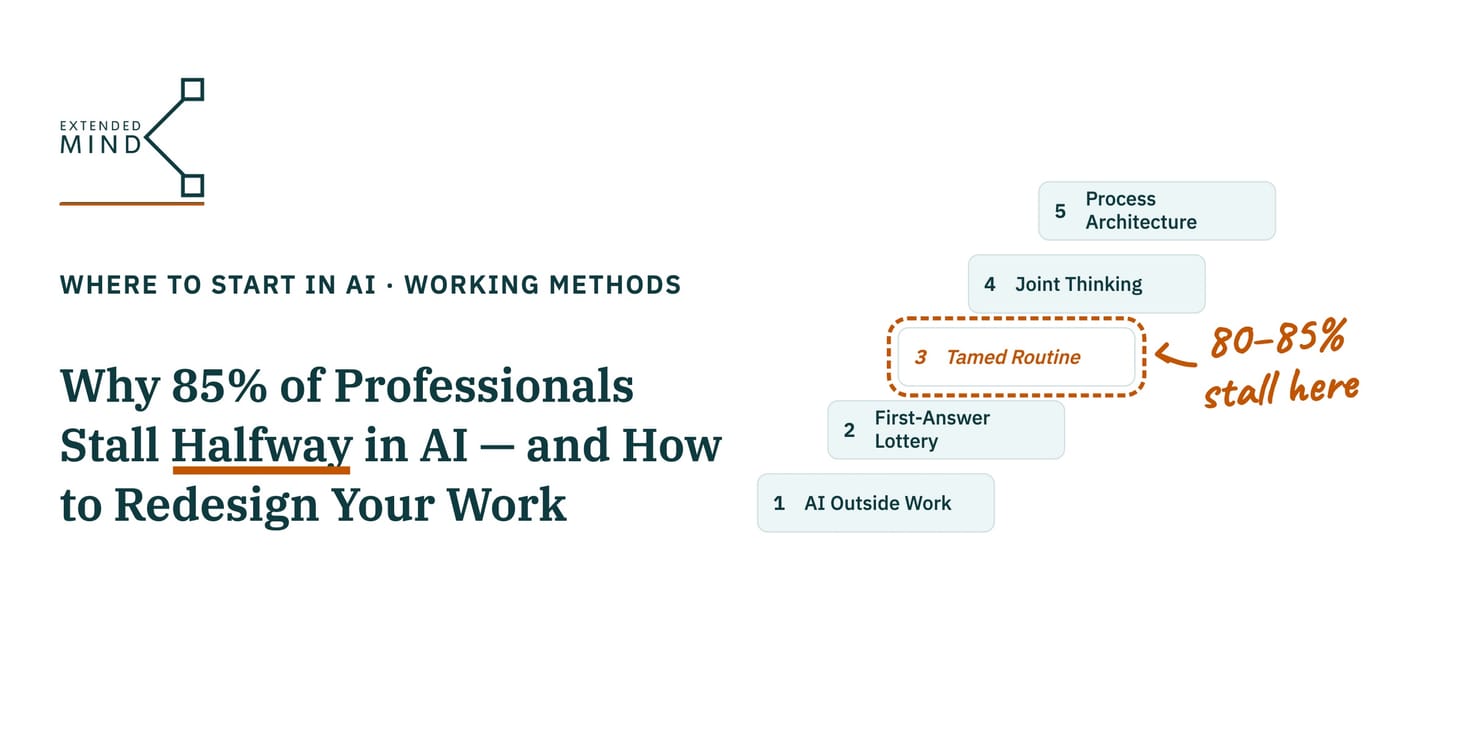
The second point is the invisible plateau. A professional masters a handful of convenient tricks — summarizing a long thread, polishing the tone of an email, translating a document, pulling together a quick reference note — and stays stuck in that zone for years. According to converging findings from independent studies in 2025–2026, 80–85% of people who already genuinely believe in the value of AI and use it every week stop right here.
I have mapped out the detailed route that we will explore and walk together in the Extended Mind project: where this path leads, how to pinpoint your current stage by looking at your actual work tools, why practice stalls even among experienced professionals, and what rules govern the transition from manual chat to managed automation.
Where the Path Leads: Two Core Capabilities and Two Dangerous Substitutions
Mastering AI is not about collecting “secret prompts” in bookmark folders or chasing news about every new model release. At the top of the route, a professional relies on two capabilities that change the very scale of their work:
- Thinking together with AI. Back in 1998, philosophers Andy Clark and David Chalmers showed that the boundary of human cognition does not end at the skull: when an external resource is integrated into your workflow so tightly that you rely on it automatically and think worse without it, that resource becomes part of your cognitive loop. Earlier digital tools — search engines, legal databases, accounting systems, and spreadsheets — merely returned a reference on request and handed control back to the human. Language models are the first tools to participate in reasoning itself: they help uncover the structure of an argument, highlight blind spots, and ask verification questions. When you think together with the machine rather than just asking it to tidy up a finished thought, your own capabilities grow with every new generation of models.
- Designing work around AI. A professional does not just open a chat window on occasion; they assemble a managed workflow tailored to their role — deciding which steps belong to regular spreadsheet formulas, where to plug in a language model, and what criteria determine whether the output is acceptable. Here it is crucial to distinguish two layers:
- Technical setup (“the buttons”): how to connect a service, link spreadsheets via Make, n8n, or scripts, and trigger a chain. This is useful today, but by 2028–2029 the systems themselves will largely handle the technical assembly.
- Strategic judgment: what can actually be entrusted to a machine, how to verify quality, where not to trust a model’s confident tone, and where the boundary of your personal accountability lies. This layer remains human for a long time to come.
The main measurable outcome of this journey is not just saving half an hour on routine tasks, but the tasks you can now take on: work that used to be out of reach in volume, speed, or cross-disciplinary complexity (for example, running several analytical workstreams in parallel or reviewing eighty documents in a single cycle instead of twenty).
Along the way to this goal, it is easy to veer into two dead-end branches that look very much like success from the outside:
- Substitution one: “AI literacy” instead of real practice. You can know everything about model architectures and follow the latest benchmarks from OpenAI, Anthropic, and Chinese labs, yet still write five-word prompts at work and close the tab after the first mediocre reply. Knowing how systems work is only an entry ticket; by itself, it does not change how you work.
- Substitution two: mindless offloading to the machine. Someone uses neural networks heavily every day, but with their own judgment switched off. For the sake of speed, they copy answers straight from chat into working files, stop building their own understanding of the problem, and answer “why did you choose this approach here?” with “that’s what the AI wrote.” From a distance it looks like cutting-edge adoption; in reality, errors go out in documents under your name while your own expertise quietly erodes.
The real goal is not to offload your job onto an algorithm, but to expand your own thinking while keeping judgment and responsibility in your hands.
Where You Are Now: Five States of Practice and Real Tools
When people assess their level in AI, they often count the number of tricks they have learned: “I can summarize meetings, write texts, translate, and generate images.” But counting templates is deceptive: you can have 30 saved prompts in a folder and still march in place for years.
Your real level is defined by which zone of your work you let the tool enter. I have broken down all five states — AI Outside Work, First-Answer Lottery, Tamed Routine, Joint Thinking, and Process Architecture — on the dedicated page “Where to Start or Continue in AI”.
The Long Stalling Zone: Why 80–85% Stop Halfway and How to Break Out
Between the first transition (when you have formed the habit of opening AI) and the second (when you have redesigned how you think and work around it) lies a wide band where most professionals get stuck for months or years. Pep talks do not work here: the person is already convinced that AI is useful, yet their core work remains unchanged.
The reason for this stall is almost never technical — it is how our professional identity defends itself and how common sense operates under daily workload pressure. Inside this zone, three psychological mechanisms are at play:
- Visible adoption without real change. Attitude toward the technology changes, but behavior at the core of the profession does not. An experienced expert genuinely praises AI at team meetings and shows colleagues how neatly a bot summarized a call recording, yet writes their core professional opinions the exact same way they did five years ago.
- Handing over trivia while guarding the core. The higher a person’s qualification and seniority, the more fiercely they protect the core of their work: handing rough routine and formatting to a machine feels fine, whereas letting AI into analysis and judgment formation feels like a threat to their own expert value (“I am an expert, not a machine operator”).
- Comparing against the wrong baseline. After getting a raw draft from a model in one minute, a specialist compares it against their polished final deliverable — which normally takes two days to produce — and closes the window saying, “It can’t match my level.”
In practice, this stalling takes one of six specific forms. Each has its own root cause — and if you misdiagnose the cause, you will prescribe the wrong cure:
| What you tell yourself (symptom) | The real root cause | What actually helps you move forward |
|---|---|---|
| 1. “I know and believe in it, but don’t use it at work” Dozens of links to tips and tools pile up in your Telegram “Saved Messages,” while at work you only use AI for minor errands. | No trigger. An abstract intention to “use AI more often” never fires when an urgent work task lands in your inbox. | Set a strict “if — then” rule tied to one weekly task: “Whenever I open a new analytical brief, I spend the first 10 minutes building its outline in Claude / ChatGPT.” Plus 5 minutes with AI at the start of the day to review your plan. |
| 2. “I use it, but only for familiar things” You confidently run 5–15 habitual templates (call summaries, translations, email polishing), but never let AI near complex tasks. | The comfort trap. Within your mastered niche, results are predictable and management is happy, whereas stepping outside it carries a risk of wasted time that nobody rewards. | Once a week, deliberately pick one “stretch task” (using AI as a critic or sparring partner) specifically to test the model’s boundaries. What works better than any article here is a live walkthrough of how a peer in your field solves a task with AI that you thought was “impossible.” |
| 3. “I tried it on an important task and was disappointed” You tried to assign a complex domain document to a model, got superficial generalities, and concluded “AI can’t handle this.” | Expecting a finished result from a single prompt. You expect the work of an in-house expert without giving the model either context in Projects / NotebookLM or an iteration loop. | Do not look for a new task — return to the exact one where you got burned. Upload anonymized context, turn on a reasoning model, and run 4–5 rounds of revision: AI provides the skeleton, critique, and options, while the final draft passes through your expertise. |
| 4. “Our process and rules don’t allow it” You use it gladly at home, but at work external services are blocked, documents sit in crooked PDF scans, or InfoSec has banned everything. | A real external environmental barrier. The only non-psychological cause: the problem lies in the organization’s setup, not in the individual. | Pumping up motivation is useless here. You need to master rapid anonymization (working with structure and indices without confidential numbers inside an approved corporate environment — such as an enterprise AI workspace or a self-hosted model) and prepare a concise one-page memo for management and InfoSec: which tasks, which data class, and how risk is controlled. |
| 5. “Too busy to redesign how I work” You see the benefit and got early results, but under burning deadlines you fall back to your old Word and Excel habits, postponing AI “until after the quarterly report.” | The short-term efficiency trap. During a crunch, doing it manually the old way really is 15 minutes faster than learning a new approach — and a quiet week never arrives on its own. | Do not launch “learning AI” as a separate project. Embed exactly 5 minutes of model work inside a step you are already doing today, and block one untouchable 30-minute slot per week in your calendar for experiments with no deliverable required. |
| 6. “Waiting for a better tool” You know model versions inside out and follow every review, yet don’t apply them at work: “It still hallucinates; once they fix it in a year, we’ll start.” | Perfectionism as armor against a failed attempt. As long as the tool is “imperfect,” any mistake can be blamed on it, so the bar of sufficiency is pushed back forever. | Name specifically what current models lack for your work, and run one time-boxed two-hour session on a real task. Then honestly calculate the cost of waiting: what you will lose by starting in two years without two years of redesigned working habits. |
How to Move Forward Together with Extended Mind
In the Extended Mind project, we will break down each state step by step using live examples from practice: showing how to anonymize data, how to configure reasoning models to uncover blind spots, how to draft “process contracts,” and how to turn routine into reliable semi-automation without losing control.
What you can do right now:
- Check your current stage: bookmark our concise navigator page “Where to Start?”, pick your step for this week, and block 15–20 minutes on your calendar for one task tomorrow morning.
- Join the case breakdowns: head over to the Extended Mind Telegram channel or our , where we walk this path together — dissecting concrete work scenarios, sharing battle-tested “process contract” templates, and honestly discussing where AI delivers a multi-fold gain and where it does not belong.
Every next step in mastering AI is chosen based on how your real work is structured today and which tasks sit right in front of you — not on a desire to leap straight to the end of the route.